Popular fasting protocols
Intermittent fasting protocols are written as fasting hours : eating hours. The bigger the first number, the longer you fast and the tighter your eating window. Here is how the common methods compare:
- 16:8 — 16 hours fasting, 8-hour eating window. The popular all-rounder; great first step.
- 18:6 — 18 hours fasting, 6-hour eating window. Once 16:8 feels easy and you want more.
- 20:4 — 20 hours fasting, 4-hour eating window. Experienced fasters comfortable with one or two meals.
- OMAD (23:1) — 23 hours fasting, 1-hour eating window. One meal a day; advanced, needs careful nutrition.
How to choose a window
The best window is the one you can keep. Most people anchor the fast to sleep — stop eating after dinner, fast overnight, and break the fast late morning or at lunch. If you train in the morning or have an early family dinner, slide the window earlier. Start gentle with 14:10 or 16:8 and tighten only once it feels natural.
Fasting controls *when* you eat, not how much — it is not a licence to ignore calories. To pair a window with a calorie target, run the TDEE calculator first.
Fasting is easier with a partner
The hard part of fasting is the willpower, not the maths. That is why Swoodie includes a built-in fasting tracker with all of these protocols, plus Fast Together — a mode that pairs you with your partner so each of you can see the other's fast as it runs — their protocol, when they started, how long they've been in — and send encouragement through the tough hours. You each stay on your own protocol. Read how fasting with a partner works or see the full intermittent fasting guide.
This tool is for general information and is not medical advice. Intermittent fasting is not suitable for everyone — including during pregnancy or breastfeeding, with a history of eating disorders, or while on certain medications. Speak to your doctor before starting.
How fasting looks and works in Swoodie
The calculator above plans your window. The Swoodie app runs the fast itself: a live timer, six protocols and, if you want company, someone fasting alongside you. Here is what that looks like.
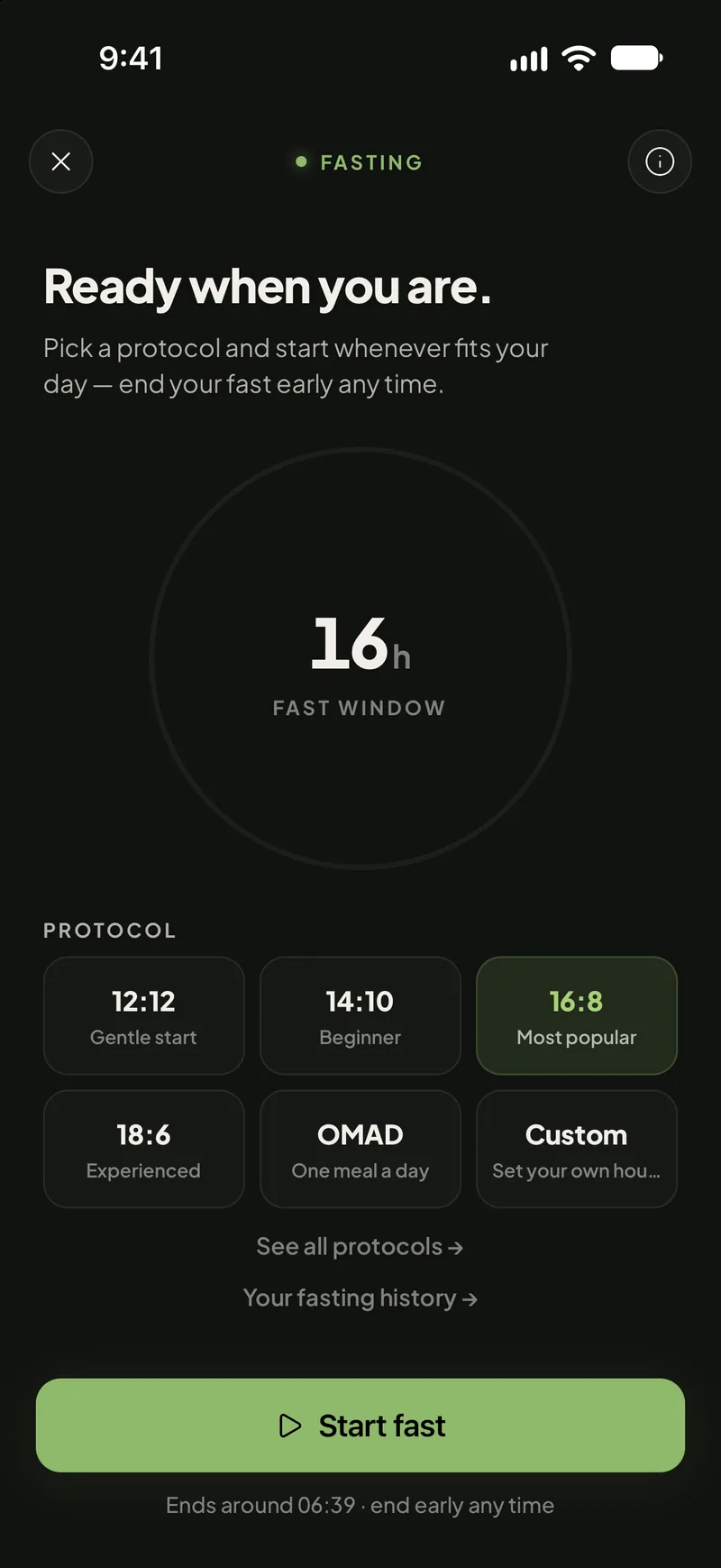
PickPick a protocol, from 12:12 to OMAD or your own hours, and start whenever suits you. 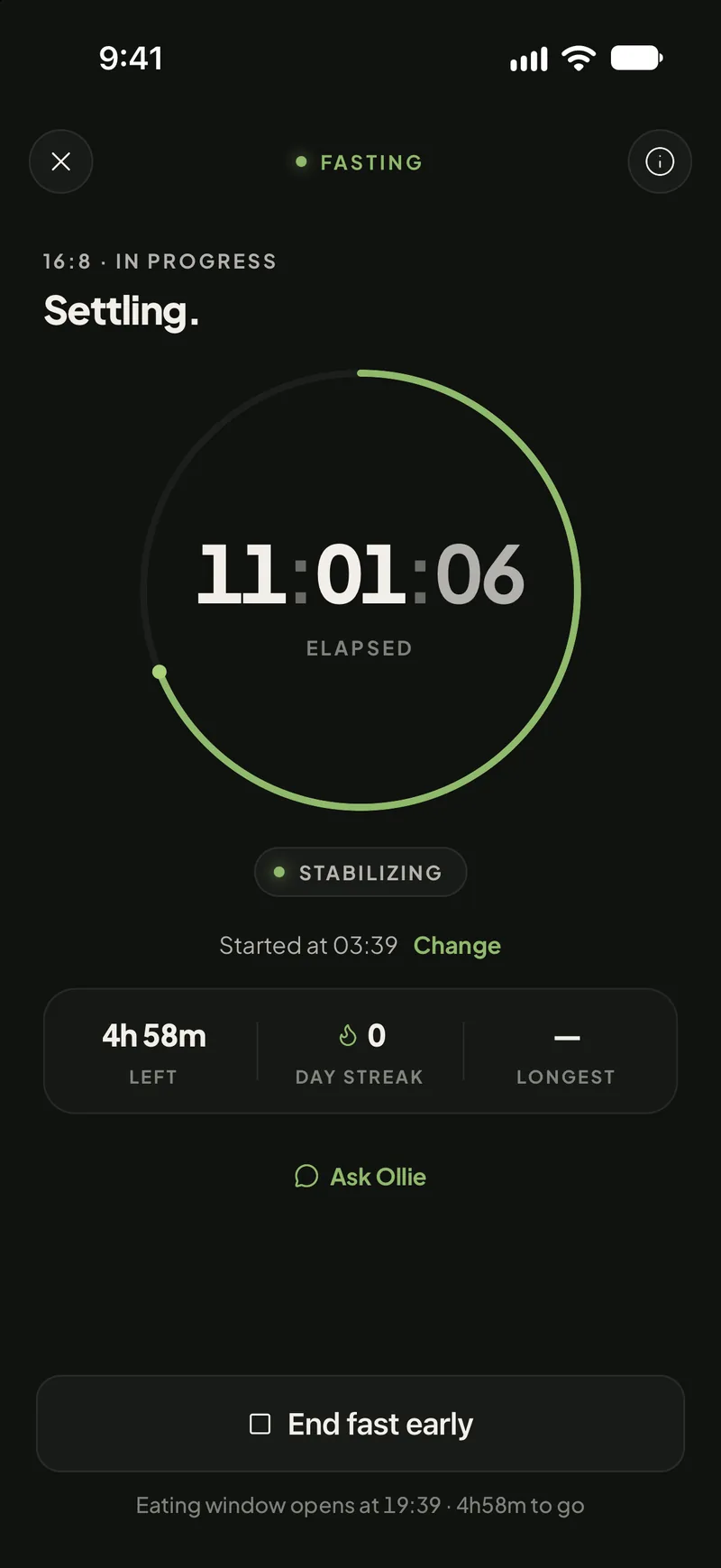
FastOne calm ring: time elapsed, time left and your day streak. End early any time. 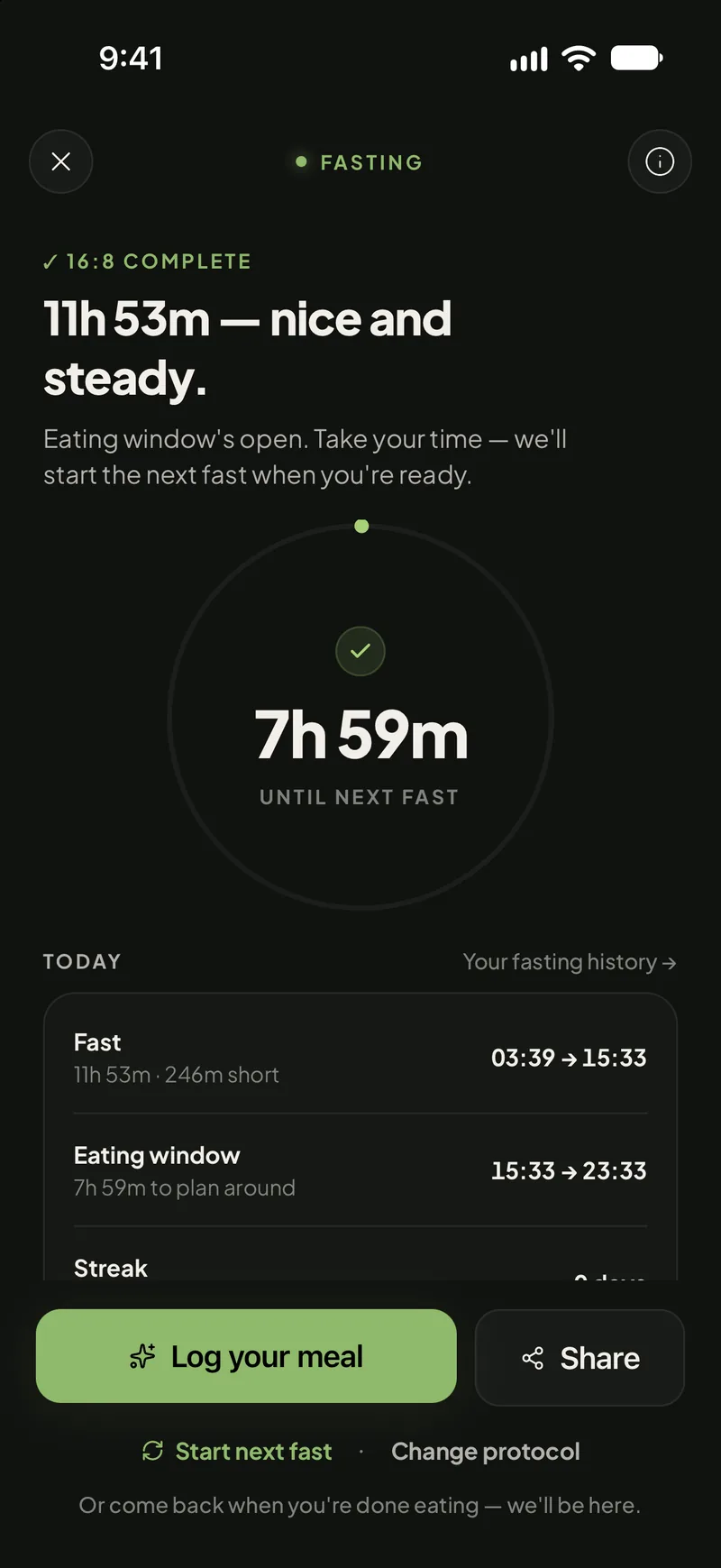
FinishWhen a fast ends: how long it ran, your eating window and a one-tap Log your meal.
- Six protocols
- 12:12, 14:10, 16:8, 18:6, OMAD, or a custom number of hours. 16:8 is the most popular; OMAD comes with a “talk to a professional” caution.
- A timer you can leave
- Start a fast and get on with your day. Swoodie counts from the moment you started, so the ring is up to date whenever you open the app, and you can change the start time if you began earlier. Need to stop sooner? End the fast early whenever your day asks for it; Swoodie won’t shame you.
- Your meal, right at the finish
- When a fast ends, logging your meal is one tap away, with today’s fast and your eating window laid out above it.
- Free to start
- Your first five fasts are free; unlimited fasting takes Swoodie Lite or Premium.
- Ollie in your corner
- Ollie, the in-app coach, can cheer you on mid-fast and answer questions through Ask Ollie. That coaching is part of Premium.
Fast Together
Pair up with one person — a 6-character code, or one tap if they are your Wellness Journey partner — and watch each other’s fast live: protocol, start time and hours in. When it gets hard, send a small nudge like “Sip of water?” or “Halfway there”; you each keep your own protocol, and your timer never changes theirs. Hosting takes Lite or Premium; joining is always free.
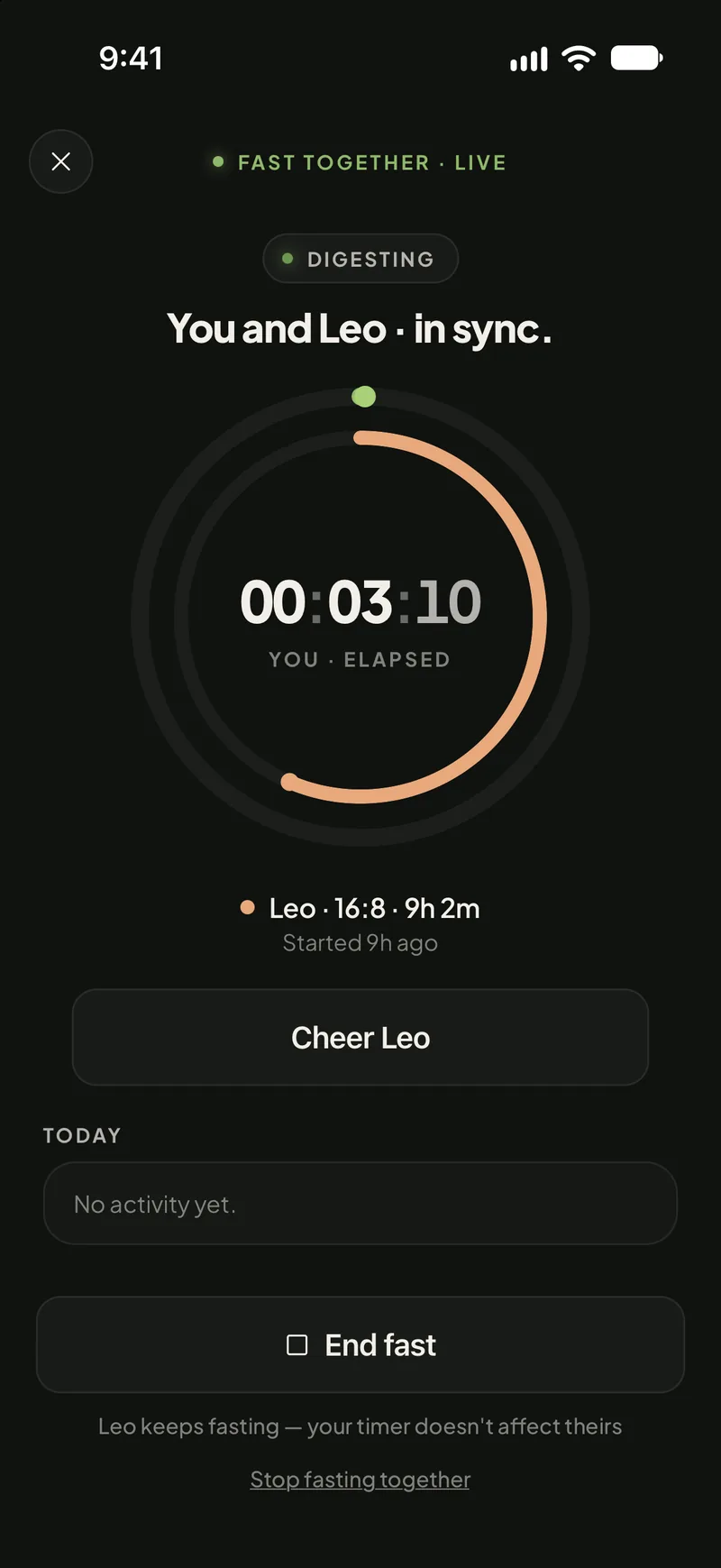
Your partner’s fast, live, next to your own timer. 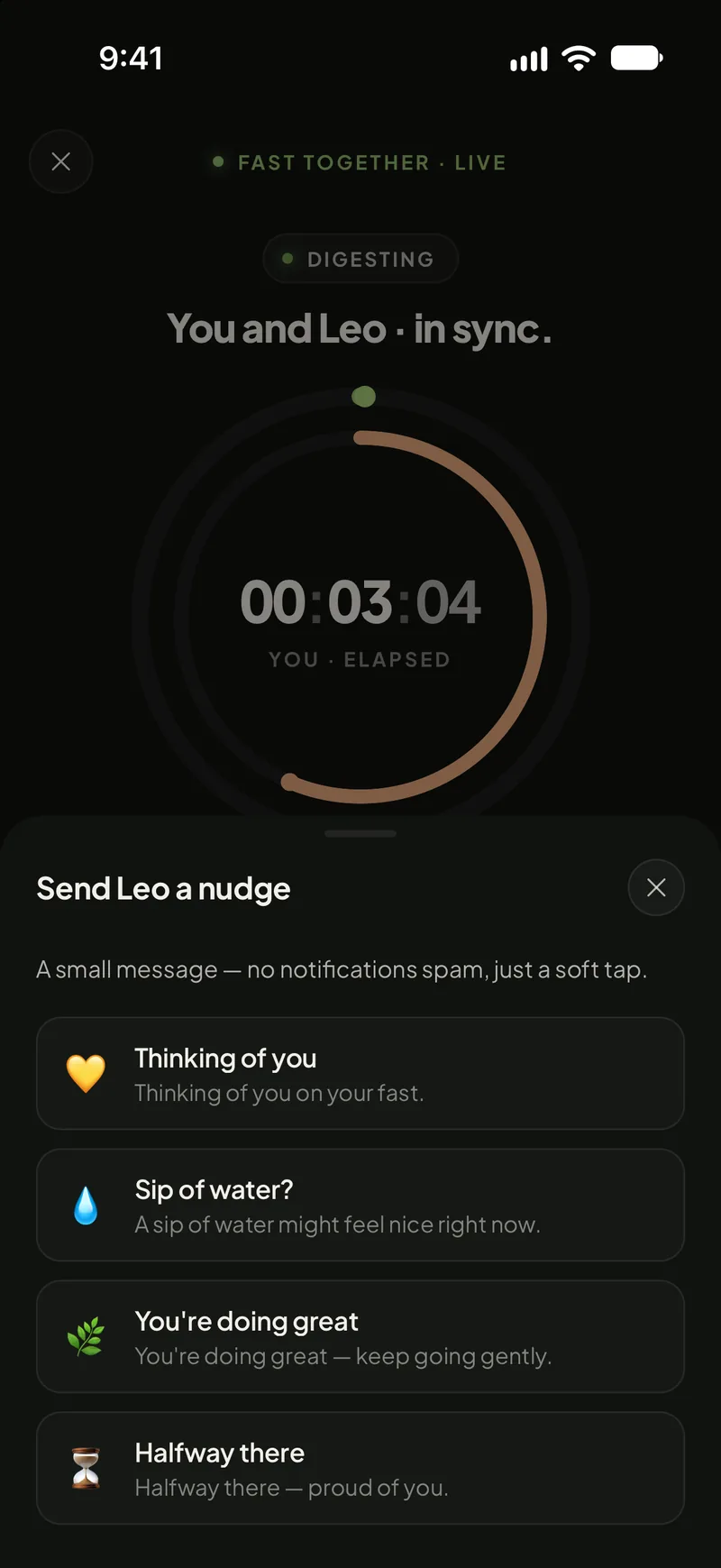
A nudge is a small message: pick one and send it.
Try it on your own schedule — your first five fasts are free.
Frequently asked questions
How does intermittent fasting work?
Intermittent fasting cycles between periods of eating and fasting. You eat all your food within a set window each day and consume only water, black coffee, or plain tea during the fast. The 16:8 method, for example, means 16 hours fasting and an 8-hour eating window.
What is the best intermittent fasting schedule for beginners?
Most beginners start with 14:10 or 16:8 because they are sustainable and largely overlap with sleep. You can stop eating after dinner, fast through the night, and break the fast late morning or at lunch. Tighter windows like 20:4 or OMAD are better once you have adapted.
When can I eat on 16:8?
With 16:8, your eating window is 8 hours long and opens 16 hours after you start fasting. If you stop eating at 8 PM, your fast ends and you can eat again at 12 PM the next day, with the window closing at 8 PM. Enter your own start time above to see your exact window.
Can I drink anything while fasting?
Yes. Water, black coffee, and plain tea are fine and do not break a fast. Avoid anything with calories — milk, sugar, juice, or sweetened drinks — as these can interrupt the fasted state.
Does this calculator use my current time?
No. It calculates your eating window purely from the start time you type in, so the result is stable and shareable. Change the start time to plan any schedule you like.
Which intermittent fasting schedule should I choose?
Beginners do well starting with a gentler window like 14:10 or 16:8 — both overlap largely with sleep and are easy to sustain. If your goal is weight loss, 16:8 suits most people; if you want fat loss while keeping muscle, 18:6 or longer gives a more focused eating window. Pick your goal above and the tool suggests the right protocol for you.